WhatsApp pet stickers
Turn one pet photo into a WhatsApp-ready sticker pack
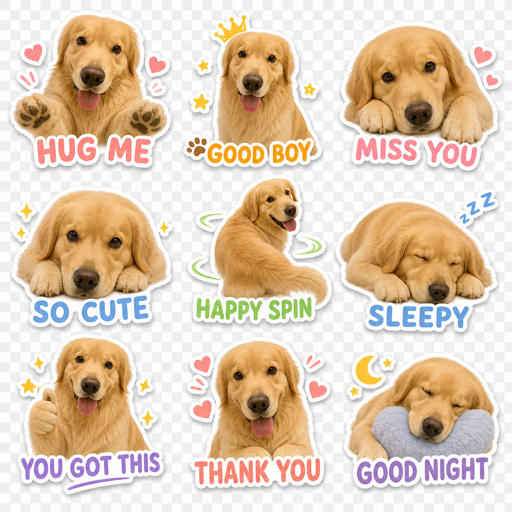
Upload a clear dog or cat photo, generate a 3x3 set of pet reactions, then download the sticker PNGs and ZIP pack for your WhatsApp import workflow.
Primary use
Built around one clear sticker task
Best for pet owners who want a recognizable pet sticker pack for group chats, replies, and inside jokes instead of a generic sticker set.
Search intent fit
People searching for a WhatsApp pet sticker maker usually want to turn a real pet photo into a recognizable sticker pack, download the files, and understand the manual import step before they commit.
Nine expressive stickers from one pet photo.
PNG downloads make the output easy to reuse.
ZIP export keeps the whole pack together.
WhatsApp output prep
Pack shape
3x3 set
Each run creates nine related pet reactions instead of one isolated sticker.
Download format
PNG + ZIP
Save individual sticker images and the full pack for your own WhatsApp workflow.
Import model
Manual
StickerPackAI prepares the images; you add them through your preferred sticker manager or WhatsApp workflow.
Output and limits
These notes make the promise explicit before users click, especially around chat-app import workflows.
StickerPackAI does not publish directly to WhatsApp; it creates downloadable PNG stickers and a ZIP pack first.
Use the downloaded files with your preferred WhatsApp sticker import workflow or sticker manager.
Static PNG output is best for personal pet reactions, group jokes, and reusable chat replies.
From generation to WhatsApp
Make the path from output to chat explicit
Generate the pet reactions
Use one clear pet photo and pick a chat-friendly style so the set feels like the same mascot.
Download the complete pack
Save the poster, individual PNG stickers, and ZIP file so the output is easy to organize.
Add it to WhatsApp manually
Use your preferred mobile sticker manager or WhatsApp import process; the page does not auto-publish to your account.
Import to WhatsApp
After generation, treat StickerPackAI as the image-prep step: it gives you the pet sticker files, then you choose the WhatsApp import path that works on your phone.
StickerPackAI does not install stickers into WhatsApp automatically. It prepares downloadable images; final import behavior depends on your WhatsApp version, phone, and chosen sticker workflow.
- 1
Download the ZIP pack
Save the full pack after generation so the poster and individual sticker PNGs stay together.
- 2
Save the PNG stickers to your phone
Unzip the pack or move the individual PNG files into your phone gallery or files app.
- 3
Create a new WhatsApp sticker pack
Use WhatsApp sticker creation when available, or your preferred sticker manager/import app, to add the downloaded pet PNGs into a pack.
- 4
Test the pack in a chat
Send a few stickers to yourself or a test chat first, then keep the best reactions in your regular sticker tray.
How it works
- 1Upload your pet photo and pick a chat-friendly style.
- 2Generate the 3x3 sticker pack.
- 3Download PNG stickers and add them to your WhatsApp workflow.
Questions
Does StickerPackAI publish directly to WhatsApp?
Not yet. This page focuses on generating downloadable PNG stickers and a ZIP pack, then guiding you through a manual WhatsApp import workflow.
What photo works best?
Use a clear pet photo with one main subject and limited motion blur.